


We’ve all experienced it – that dreaded moment when you’re in the garden or kitchen and… the music just stops. If you’re wondering, Why does my Bluetooth speaker keep cutting out?, we’re here with a variety of reasons this could be happening. Some are straightforward to resolve, while others can be a bit more troublesome.
In this article, we’ll walk you through the five most common causes and explain how to fix each one, so you can bring uninterrupted music back to your Bluetooth speaker.
Key takeaways
Here are the five reasons your Bluetooth speaker might be cutting out:
- Low battery
- Signal interference
- Out of range
- Device compatibility
- Software bugs
Why does my Bluetooth speaker keep cutting out?
1. Low battery
If you’re using a battery-powered device, such as a mobile phone or portable music streamer, to transmit music to another Bluetooth device – like a portable Bluetooth speaker or a pair of active speakers – then low battery mode can disrupt the signal. This happens because the device reduces signal strength to conserve power, which can cause dropouts in music playback.
The same applies to Bluetooth portable speakers. As their battery runs low, both signal strength and processing power can decrease, which also leads to playback interruptions.
Solution: Charge the battery
This one needs little introduction. Just as we need food, water, and rest to recharge, our portable music players also become a bit more temperamental – especially in low power mode.
Making sure both your Bluetooth speaker and portable music player are adequately charged is key to reducing audio cutouts. Insufficient charge can lead to instability in the internal components, particularly when playing music at higher volumes.
2. Signal interference
Bluetooth is an amazing wireless streaming system, effectively creating an invisible wire between your music streaming device and Bluetooth speaker using a transmitter and receiver.
The challenge with this technology is that it’s susceptible to interference from walls, large obstacles, and even other electronic devices in the home, all of which can disrupt the signal.
Another potential issue is the internet streaming signal itself. If your device is relying on a poor or unstable internet connection, it can hinder communication with the speaker. We’ve all been there.
Solution: Remove obstructions or restart the router
There are two main areas to consider: the Bluetooth connection itself and the wireless connection to your streaming device. With Bluetooth, obstacles like walls can interfere with the signal. Removing these obstacles – or repositioning your device – can often improve signal strength and reduce unwanted audio cutouts.
If the issue stems from your streaming signal, restarting your router is a good place to start. Routers benefit from the occasional reboot, and once reconnected to your internet provider, they typically establish a fresh connection that resolves most streaming-related problems.
3. Out of range
Bluetooth has a transmission range of approximately 10 metres (or 33 feet), according to Bluetooth standards. But when you push those limits, you’re likely to experience cutouts. While Bluetooth is a capable wireless technology, it does have its boundaries.
Much like Wi-Fi, exceeding this range can lead to instability and unwanted side effects, such as signal dropouts, gaps in playback, and even clipping – none of which your speakers will handle particularly well. That’s why it’s important to keep things within range and under control.
Solution: Keep devices within range
If your devices are operating at the limits of their recommended range, you’re likely to run into problems. The only reliable fix is to bring your Bluetooth devices back within the manufacturer’s specified distance range.
You may have also noticed that battery level and physical obstacles can further reduce this effective range. Every environment is slightly different, so there’s no one-size-fits-all recommendation – your setup will be unique to your space and devices. Understanding those limits is key to getting the most out of your Bluetooth experience.
4. Device compatibility
Even though we refer to it simply as Bluetooth, there are actually different versions and types of Bluetooth connectivity. While most are designed to work together, some can occasionally glitch, leading to odd issues where the streaming device and Bluetooth speaker fail to connect at all.
In more frustrating cases, these compatibility issues can cause random cutouts with no clear explanation.
Solution: Match the Bluetooth versions
The issue often comes down to mismatched Bluetooth versions or profiles. While it might not be immediately obvious, these differences can be the root cause of cutouts. In some cases, the devices were never fully designed to work together, or you may need to adjust the settings on one or both devices to align their output levels and ensure compatibility.
5. Software bugs
Another common reason your Bluetooth speaker might be cutting out has nothing to do with the signal itself. Software glitches are often to blame – and software sits at the heart of nearly every device we use today.
The issue could lie with your portable Bluetooth speaker, your active Bluetooth speaker, or even the streaming device itself. This is especially true if you’re using a mobile app on a smartphone, as software-related bugs can cause cutouts even when everything else appears to be working fine.
Solution: Update the firmware
Software issues aren’t common, but occasionally a firmware or app update can fail, leading to all sorts of unexpected problems. In many cases, you’ll need to wait for the brand to release a fix.
The one saving grace here is that you’re likely not alone, and it doesn’t necessarily mean your equipment is faulty. It might just be a matter of waiting for the brand’s next update – or performing a factory reset, which can often resolve the issue in the meantime.
Our experts’ favourite Bluetooth speakers
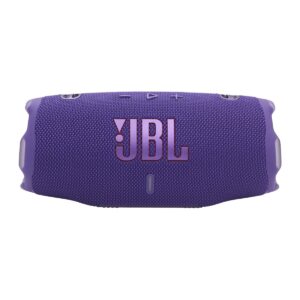
JBL Charger 6 Portable Bluetooth Speaker
- Lossless playback
- 28-hour playback
- IP68 rating
- Built-in powerbank
- Fast charge
ELAC Designer Series Debut ConneX Adsum Speaker
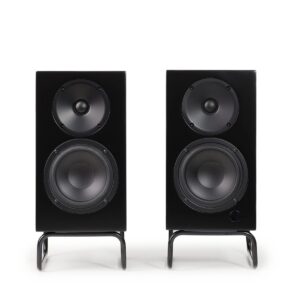
- Bluetooth AptX
- HDMI (ARC)
- 2x 50w amplifiers
- XBass Enhancer
- Built-in phono stage
KEF LSX II Wireless Hi-Fi Speaker System
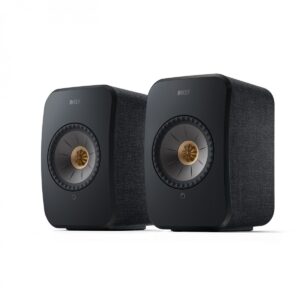
- Bluetooth 4.2
- Easy music streaming
- Roon ready
- HDMI (ARC)
- 200-watt amplification
FAQs
Why is my Bluetooth speaker glitching?
There are a few reasons why your Bluetooth speaker might be glitching, but the most common is the battery life. So, check the juice, and if it’s on low power, it’s time to plug it in and boost that battery.
How do I reset my Bluetooth speaker?
To rest your Bluetooth speaker, you’ll need to consult the manual, as you may have to press multiple buttons to activate this feature.
Why does my Bluetooth speaker cut out repeatedly?
If your Bluetooth speaker keeps cutting out, even after you have restarted it, there could be something interrupting the signal. Even things like Wi-Fi networks and microwaves can have an impact, so make sure there’s a clear signal path between the speaker and smart device.
Final thoughts
While we can’t completely eliminate every possible reason, we hope we’ve answered your question, Why does my Bluetooth speaker keep cutting out? We’ve outlined some of the most common causes – along with practical solutions to fix them. After all, no one enjoys music that cuts out, whether you’re relaxing on your own or spending time with friends.




0 Comments