
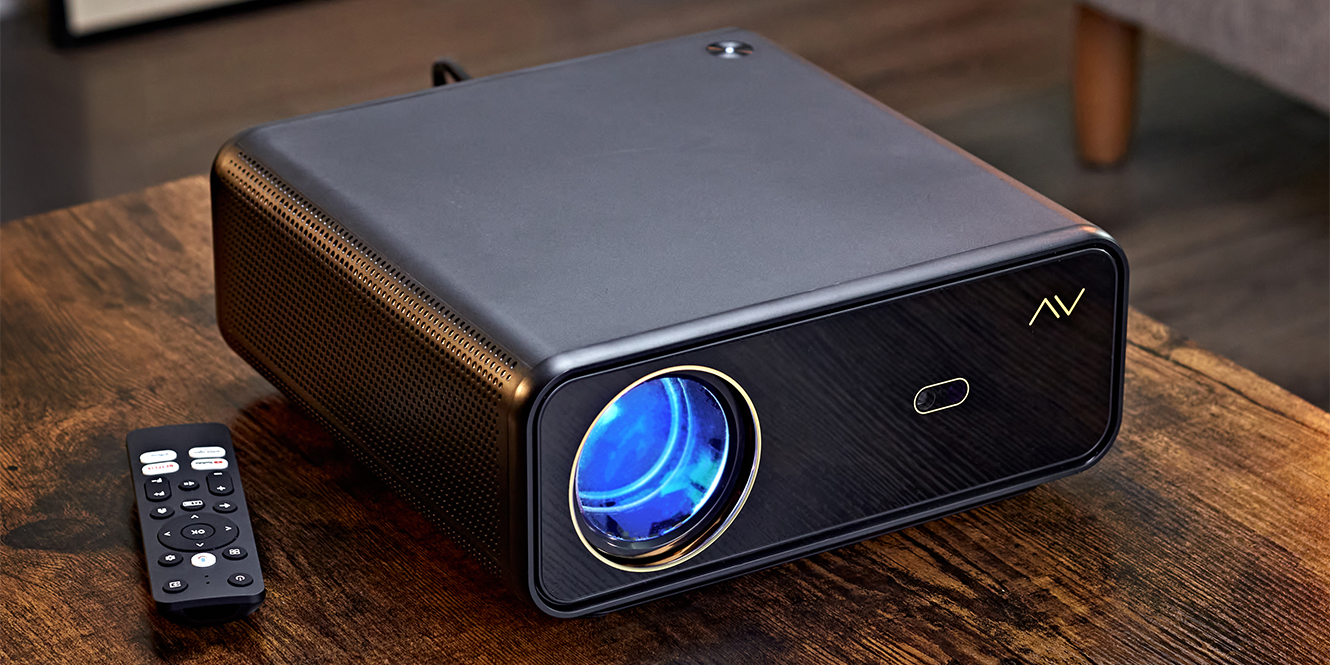

Projectors as a concept have been around for longer than most of us probably realise, with the first iterations appearing in the 1600s and the first motion picture projectors arriving in the 1800s. It’s safe to say we’ve come a long way since then, but the overarching design has remained the same: light – now often lasers – projected through optics to create an image.
Projectors are pretty cool. Fast forward a few centuries, and having one at home is something that’s relatively attainable. That said, projector setups are never the cheapest endeavour, given the complexity of how they work and the fact that to get the most out of them, you need a proper screen.
With consumer projectors ranging anywhere from £50 to £28,000, there’s a huge scope for quality. But you no longer need to be a tech start-up founder to get a solid setup. The big screen experience is more accessible than ever, and with that in mind, here is our list of the 9 best budget projectors (relatively speaking!).
In a hurry?
| Epson EH-TW7100 | Feature-rich, excellent image quality, and all-round just brilliant. | Check the current price |
| AVCOM FHDP160 FHD 1080p Smart Projector | For a small, affordable projector, this has everything you could reasonably need or want. | Check the current price |
| Hisense PT1 | A more “affordable” entry point into the home cinema and laser TV world. | Check the current price |
Why we’ve chosen these projectors
The projectors we’ve chosen are based on a few key factors: how they perform, what they offer, and how flexible they are in terms of throw ratios, positioning, and image adjustments.
Given that projectors are one of the more expensive areas of the AV world, we’ve set a budget cap of £1,800. Within the broader range of consumer projectors, this sits towards the lower end. If you’re after more premium features and performance, there’s a clear sweet spot between £900 and £1800, where you tend to get strong value for money.
That said, there are still good models available under £500. You’ll need to accept some compromises on image quality and features at that level, but for casual use, there are plenty of worthwhile options, which we’ll cover below.
The best budget projectors
1. AVCOM HDP30 HD Projector
 Key features
- Compact HD projector with auto keystone correction
- 720p native resolution (1080p supported)
- Wireless screen mirroring from Android and iOS devices
Pros
- Screen mirroring allows for a broad range of use case scenarios
- Inexpensive
- Small footprint makes it transportable
Cons
- Not very bright
The AVCOM HDP30 is an inexpensive projector in the wider scheme of home cinema. You’re not getting 4K, laser definition, or anything especially advanced, but what the HDP30 does give you is a way to test the waters without a big commitment.
It’s not designed to rival a dedicated cinema setup, and it doesn’t need to. Think of it as something for casual film nights, a quick presentation, or even projecting stars on the ceiling with the kids. Wireless screen mirroring makes setup simple, and its compact size means you can carry it between rooms or take it with you.
For me, it brings back memories of my dad using an old slide projector to show photos of the night sky from his astronomy days. It had that sense of sharing something bigger than the little box in front of you. The HDP30 has a similar charm.
It won’t blow anyone away on specs, but as a first step into projection, it makes sense. Small, straightforward, and capable of delivering a bit of magic without asking for much in return.
2. AVCOM FHDP160 FHD 1080p Smart Projector
 Key features
- Android TV projector with 4k upscaling
- Autofocus and auto keystone for fast, sharp image alignment
- Projects up to 300″ from 9.2 metres away
Pros
- 1080p native resolution
- Built-in OS allows you to use this like a smart TV
- Inexpensive but feature-rich
Cons
- Not bright enough to do 300” without the right conditions
If the HDP30 was about dipping your toes into home projection, the AVCOM FHDP160 is wading in up to your shins. It takes the same approachable idea and expands on it with sharper visuals, more features, and just enough smarts to feel like a proper modern TV replacement.
You get native 1080p resolution here, with 4K upscaling to add detail when the content allows. That means the picture looks cleaner and more precise on bigger screens, scaling up to 300 inches if you have the space. Most people will probably stick around the 100 to 150 range, where the balance of sharpness and size works best.
Setup is easy thanks to autofocus and auto keystone correction. In a few seconds, the image is aligned and sharp, without the usual trial and error of nudging a projector into place. It feels more forgiving than many models at this level, which makes it straightforward to live with.
The big upgrade over the HDP30 is the Android TV 12 platform. Once it’s on Wi-Fi, you have Netflix, Prime Video, and YouTube ready to go without extra boxes or sticks. Add in multiple HDMI and USB inputs, plus Bluetooth and a headphone jack, and it handles most sources comfortably.
It is not the brightest projector around, but in dimmer rooms, the FHDP160 offers a smart, flexible, and much more polished step into home cinema.
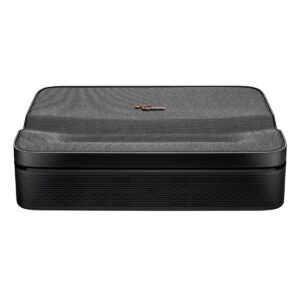
3. Optoma Photon Go Portable Ultra Short Throw Projector
 Key features
- RGB Tri-laser technology
- Wi-Fi and Google TV built in for easy streaming and apps
- Auto keystone and focus for instant setup
Pros
- Internal battery for on-the-go situations
- Ultra short Throw ratio for close-proximity projections
- High contrast ratio thanks to the tri-laser configuration
Cons
- Battery life is only 1.5 hours
This isn’t a projector that’s trying to be a centrepiece for a full home cinema room, and that’s exactly what makes it interesting. The Optoma Photon Go is a portable ultra-short throw model, designed to give you a taste of laser projection in a package you can pick up and carry around.
It uses an RGB tri-laser system, which is unusual at this size and price. The benefit is colour and contrast that feels richer than you’d expect, even when projecting just a few inches from the wall. Place it close to a flat surface, and you can still get a crisp image up to 100 inches wide. Autofocus and auto keystone keep things lined up, so you don’t spend time fiddling with menus before you get started.
The built-in Google TV platform adds another layer of convenience, and all the usual streaming apps are ready without needing to plug anything else in. It even has an internal battery, but it only lasts about an hour and a half. In other words, you’ll make it halfway through the first Godfather film before it calls it a night. Plugged in, of course, you can get through all three if you’re committed enough.
It won’t replace a permanent home setup, but that isn’t the point. The Photon Go is about flexibility — a projector you can take with you, set up quickly, and enjoy without much effort. It makes projection feel easy, and that accessibility is where it earns its place.
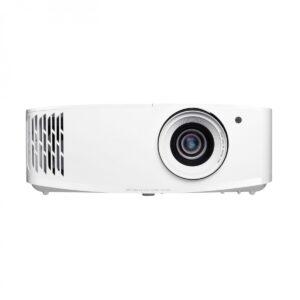
4. Optoma UHD38X 4K UHD Projector
 Key features
- 4K UHD image processing and 3D compatible.
- HDR and HLG compatible
- 4000 Lumens is bright enough for all-around usage
Pros
- Can project up to 300”
- Vertical and horizontal Keystone correction (should you need it)
- Smart correction features allow you to maximise performance, even projecting onto an uneven wall
Cons
- Lamp-based
The Optoma UHD38X is a great example of a projector that balances performance with practicality. You’re getting true 4K image processing, a serious 4000-lumen brightness rating and full HDR support, all packed into a model that doesn’t need a blacked-out cinema room to shine.
Its standout strength is flexibility. Whether you’re projecting onto a proper screen or just a painted wall, it can adapt the image with both vertical and horizontal keystone correction. There’s even a wall colour setting, which helps keep colours accurate on off-white surfaces. That means you can make the most of it without a perfect setup.
It’s also well-suited to gaming. Input lag can drop as low as 4.2ms, with up to a 240Hz refresh rate for smooth, responsive visuals. Add in support for 3D playback, and you’ve got a projector that covers more than just movie nights.
The one thing to bear in mind is that it’s lamp-based, so there will be eventual bulb changes to consider. But for an all-round home entertainment projector with serious output and some clever built-in tools, the UHD38X offers strong performance across a wide range of spaces.
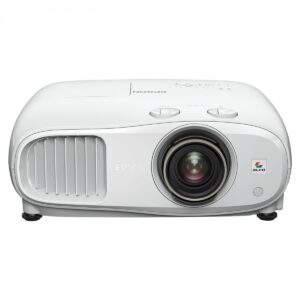
5. Epson EH-TW7100 4K Pro UHD Projector
 Key features
- 4K PRO-UHD delivered on up to 500 inches
- 3LCD technology
- Provides lens shift, zoom, and keystone correction
Pros
- What Hi-Fi-rated best projector sub £2,000 2020-2024
- 3000 Lumens, both in colour and white light output
- Keystone correction (again, if you need it)
Cons
- The built-in speakers aren’t great, but ideally you’d have this as part of a more elaborate setup, soundbar on the arc connection perhaps
The Epson EH-TW7100 has long been a favourite for anyone after a reliable home cinema setup without spending silly money. Its 4K PRO-UHD processing paired with Epson’s 3LCD technology gives you a bright, sharp image that avoids the rainbowing artefacts you sometimes see with single-chip DLP projectors.
Colours look natural, contrast holds up in darker scenes, and it feels just as comfortable in a dedicated room as it does in a living space with some light creeping in.
What makes the 7100 stand out is how forgiving it is to set up. Generous lens shift, zoom, and keystone correction mean it can go in places where other projectors might struggle. You don’t need everything perfectly lined up or a completely dark cave to get a great result.
In my own experience spec’ing home cinema systems, the 7100 is the golden child. It’s where performance, functionality, and cost balance out, which is probably why it’s so often recommended.
It can technically throw an image up to 500 inches, though most people settle somewhere around 120–150. The built-in speakers are serviceable, but a soundbar or AV system is a better match for its picture quality.
If you stopped me in the street and asked my thoughts on the 7100, my answer would be twofold: first, “How did you find me?” and second, “Big up the 7100.”
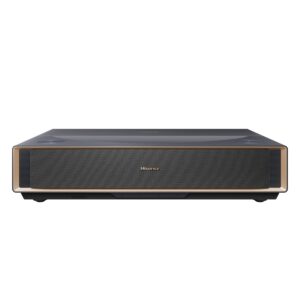
6. Hisense PT1 4K Smart Laser Cinema Projector
 Key features
- 4K resolution with HDR10+ support
- Low-latency Game Mode with ≤30ms input lag
- AirPlay 2, screen sharing, and app integration
Pros
- Ultra short-throw projector for close-proximity positioning
- Smart OS with built-in app integration
- Laser projectors have a much greater lifespan than bulb technology
Cons
- UST projectors really benefit from a screen, not the best for projecting straight to a wall.
Hisense has built a name for itself with ultra-short throw projectors, and the Hisense PT1 brings that know-how into a more accessible package. It shares DNA with the bigger PX models, but sits at a price point that feels a lot more realistic if you’re just starting out with projection.
Being a UST projector, the PT1 only needs to sit a few centimetres from the wall to throw a 4K image. That makes it ideal for living rooms where you can’t run a projector all the way to the back, and the built-in VIDAA smart system gives you apps like Netflix, Prime Video, and Disney+ straight out of the box. There’s also AirPlay 2 and screen sharing, so casting from your phone is easy.
Picture quality is where the laser light source pays off. Colours are punchy, HDR10+ brings extra detail to darker and brighter scenes, and input lag is low enough for casual gaming. The speakers are better than most all-in-one units, though still not a match for a decent soundbar.
Like the LS650 (next on the list), the PT1 really benefits from being paired with a proper screen. No matter how good your plasterer or painter is, a wall will always have a bit of texture, and once you shine a bright laser projector onto it, every little imperfection shows up.
With the right screen in place, though, the PT1 feels like a proper way into laser TV, simple to live with, sharp to watch, and far less fussy than long-throw designs.
7. Optoma UHD35STX 4K UHD Short-Throw Projector
 Key features
- Short-throw lens
- 4K UHD with HDR10 and HLG support
- Ultra-low input lag
Pros
- Delivers a large image in small rooms
- Works well in daylight with vivid colour
- Supports high refresh rates for smooth action
Cons
- Some features are disabled at high refresh rates
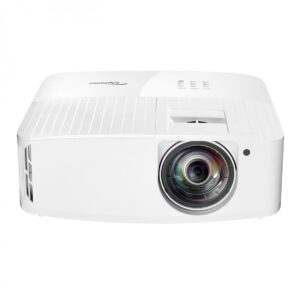
The Optoma UHD35STx gives you a cinema-sized image without the need for a massive room. It can produce a 100-inch display from just over a metre away, making it ideal if you’re setting up in a compact space, and it delivers a picture with excellent colour and brightness, even in rooms that aren’t fully dark. Thanks to ISF calibration modes, you can tailor the picture for both daytime and evening viewing, while HDR10 and HLG support also add greater depth and realism to films and games.
If you’re after smoother motion, the 240Hz refresh rate is there, covering fast-paced action comfortably. And if you’re a gamer, the low input lag – as little as 4.2ms at 1080p – gives you that accuracy and timing.
Better still, the projector is super easy to set up. It boasts four-corner correction and a wall colour setting that lets you adjust for projection on non-white surfaces. To connect, you had dual HDMI ports and USB power output.
8. Hisense C2TUK 4K Trichroma Smart Mini Projector
 Key features
- 4K AI Upscaling
- Cinematic screen size from 65 to 300 inches
- Pure Triple Colour Laser for vivid images
Pros
- VIDAA U7 OS makes it incredibly easy to use and live with day to day
- HDR10+ and HLG support – brings out deeper contrast and enhanced brightness
- Gimbal mount for wide placement flexibility.
Cons
- Fixed throw ratio of 1.2:1
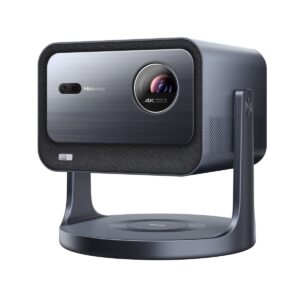
One of the Hisense C2TUK’s defining features, among the many, is its Pure Triple Colour Laser system. Instead of splitting a single light source into red, green, and blue, it uses three dedicated lasers, one for each primary colour. The effect is a broader colour gamut, better tonal accuracy and a picture that feels more lifelike, particularly with HDR10 and HDR10+ content.
It is less about turning the colours up to eleven and more about getting them right.
Resolution and scale are equally flexible. You have native 4K, with AI upscaling to tidy up lower-resolution sources, and a screen size that can stretch from 65 inches to 300. Brightness is balanced to favour detail and coherence rather than blinding intensity, which makes for a more natural image overall.
Usability is straightforward, too. The gimbal mount makes placement less of a headache, and the VIDAA U7 operating system brings you Netflix, Disney+, Prime Video, and all the usual suspects. Casting is simple with AirPlay 2 and screen sharing, and connectivity covers all the essentials, including HDMI 2.1 with eARC.
Sound is handled by built-in speakers that are more than fine for everyday use, though pairing with a soundbar or system unlocks a level of presence the visuals deserve.
In short, the C2TUK manages to stand out in a crowded market by offering true trichroma performance in a compact, approachable form.
They also offer the Pro and Ultra versions of this projector with greater enhancements, but these would fall outside our prescribed “budget”.
9. Optoma UHZ66 Projector
 Key features
- True 4K UHD visuals with HDR support
- Laser light source offers 4000 lumens in brightness and a 30,000-hour lifespan
- 4:1 – 2.24:1 throw ratio for placement flexibility
Pros
- 709 colour gamut and 3D compatibility
- 360-degree projection allows you to angle the projector however required to fit a space, and the image will always be level
- 4000 Lumens means this projector can keep up in brighter environments
Cons
- Contrast ratio isn’t as impressive as some other laser projectors
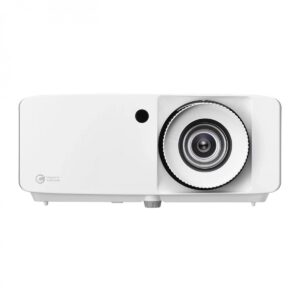
The UHZ66 is a laser projector that puts reliability and practicality front and centre. With a rated lifespan of up to 30,000 hours, you are spared the usual lamp-change cycle, and the image stays consistent over years of use. At 4,000 lumens, it holds its own in mixed lighting conditions, though like most single-laser DLP designs, it really shines once the room is dimmed.
Picture quality is clean and detailed. True 4K resolution, HDR, and HLG support bring extra depth when the content allows, and colour reproduction covers the Rec.709 gamut. It is not as expansive as trichroma systems, but it feels stable and accurate enough to suit films, television, and sport without looking artificial.
Flexibility is another strength. The throw ratio gives you a good range of placement options, and the ability to project anywhere from 26 to over 300 inches means it can work in smaller setups or larger dedicated rooms.
Where it becomes interesting is in gaming. Input lag can drop as low as 4.4ms in Game Mode, and refresh rates go up to 240Hz, which is territory normally reserved for monitors rather than projectors. Fast-paced titles feel responsive, and it manages to keep motion smooth without obvious artefacts. If you are used to gaming on a large TV, this gives you that scale without sacrificing too much in terms of speed.
It may not be the most cinematic projector in the lineup, but if you want something that pulls double duty for both movies and serious gaming, the UHZ66 makes a strong case for itself.
How to choose the best budget projector for you
Choosing the right budget projector is less about chasing the highest spec sheet and more about finding something that fits your space and how you actually plan to use it. The first step is knowing your room measurements. Projectors live and die by throw ratio, and there is usually more maths involved than people expect.
Ultra short-throw (UST) models, like the Hisense PT1 or Optoma UHD35STX, can sit right against the wall and still give you a 100-inch image. More traditional designs, like the Epson TW7100, need more breathing room, and you will want to do the sums before you buy.
Once you know it will fit, think about your environment. Brightness is key if you are dealing with daylight or ambient light, while contrast and colour accuracy matter more if you are setting up a darker, cinema-style room. There is no right answer here, just what makes sense for your setup.
Connectivity is another factor. Some projectors have built-in smart platforms, so they work almost like a TV. Others are more barebones and rely on you plugging in a streaming stick, console, or Blu-ray player. Neither approach is better, but one might suit you more than the other.
Sound also deserves attention. Onboard speakers will cover the basics, but if you want a proper cinema feel, a soundbar or surround setup is worth the extra step.
If you get the basics right, everything else tends to fall into place.
Useful knowledge
One of the most important but often overlooked parts of buying a projector is understanding throw ratios. It sounds technical, but really it just describes the relationship between how far your projector is from the wall or screen and how wide the image ends up.
The formula looks like this:
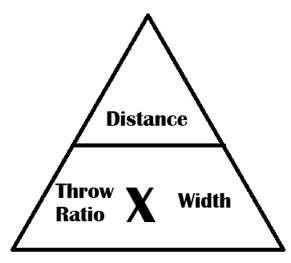
Throw Ratio = Distance from projector to screen ÷ Image width
- Distance = Throw Ratio × Width
- Width = Distance ÷ Throw Ratio
- Throw Ratio = Distance ÷ Width
That also means you can flip it around. If you know two of the numbers, you can always work out the third. For example, a projector with a throw ratio of 1.5 will need to sit 3 metres back to produce a 2-metre-wide image. Change that ratio to 2.0 and you’ll need 4 metres for the same image size.
Where it gets interesting is when you compare different types of projectors. Ultra short throw (UST) models, like the Hisense PT1 or Epson LS650, have throw ratios as low as 0.2. That means you can place them just a few centimetres from the wall and still get a 100-inch picture.
On the other hand, something like the Epson TW7100 has a more traditional throw ratio, so you’ll need to think more carefully about placement and distance to get the screen size you want.
The key point is that throw ratio is predictable. As long as you know your room size and the screen size you want, the maths will tell you whether a projector will actually fit your space.
For example:
If I have a 120” screen and I want a projector at the back of my 5m room, I would have to convert the 120” diagonal to a horizontal in centimetres (makes life easier to use one metric). I’ll spare you the maths but it’s about 266cm wide. Then you would go 500cm (distance) divided by 266cm (screen width), and this gives you 1.87 (throw ratio).
*this is for a 16:9 image, as it’s the most common.
FAQs
What are common problems with budget projectors?
Depending on your definition of budget, picture quality is usually the main compromise of budget projectors. Brightness, contrast, and motion handling also often reveal the limits of more budget models
Do budget projectors need a special screen?
Budget projectors don’t need a special screen to work. That said, any projector will look noticeably better when paired with one.
What do I need to know when buying a projector?
You need to know your room measurements as there’s often more maths in projector setups than expected. Throw ratio, placement, screen size, and aspect ratio all play a role in getting the right fit.
Final thoughts
My final thoughts on the matter are, as always: only you can decide what’s best for you and what you want to do. Don’t let me – or anyone else – tell you otherwise. It comes down to your needs, your space, and your budget.
That said, projectors remain one of the more expensive ways into home cinema. While the cost of premium features has dropped over the years, projection will likely never be the cheapest way to get a picture on the wall. The difference now is that the gap between “entry-level” and “serious” models has narrowed. You can now pick up projectors with features that would’ve been unthinkable at this price point not long ago.
And that’s the exciting part. You no longer need a dedicated cinema room or an AV installer on speed dial to enjoy a proper big-screen setup. Even if this is your first step into home cinema, chances are you’ll end up with something that feels like a serious bit of kit rather than just a novelty.
So whether you choose a compact, travel-friendly model, a bright all-rounder, or one of the new wave of ultra short throw lasers, the point remains the same: the big screen is now genuinely within reach. We hope you’ve found something that suits your space on our list of the best budget projectors!



0 Comments